What to put on a restaurant or menu-board screen in 2026, which software to use, and what it really costs. Practical guide for 1-7 screen restaurants.
Looking to buy? This is an editorial guide on what to display + when. For pricing, setup, and a quote on restaurant digital signage, see our restaurant industry page.
In a survey of 1,000 American shoppers, 76% said they had walked into a store they had never visited before because of its signage alone (FedEx Office, 2012). The number is old, but the lesson holds: a screen in your window is not decoration, it is your first line of sales.
Most Finnish restaurants are still running paper menu boards, A4 printouts, or a TV showing yesterday's slideshow. The technology to do better is now plug-and-play and costs less than a single dinner shift in revenue. The hard part is not the hardware. The hard part is figuring out what to put on the screen, when to show it, and how to keep the content fresh without it becoming another job nobody has time for.
This guide walks through exactly that. With a real Finnish example, a daypart schedule you can copy, and transparent cost math.
Key Takeaways
- Digital menu boards typically lift restaurant sales 3-5%, and daypart-specific scheduling adds 5-7% more in slower periods (Cornell Hospitality Quarterly, 2008)
- In 2026, Finnish chains like Pretty Boy in Helsinki are switching all locations from static menus to digital (invidis, April 2026)
- InfoBox software starts at €108/year/screen (1-9 screens) or €84/year/screen (10-50 screens). Most customers don't need separate hardware. InfoBox runs directly on Android TVs and Android sticks they already own. The InfoBox stick (€59 each, one-time) is available if you need it
Why Digital Signage Pays Off in a Restaurant
Digital menu boards drive a 3-5% sales lift on average across QSR rollouts (WAND Digital, 2024), and McDonald's reported a 3.8% increase in average check size after rolling out daypart-specific menus across 13,000+ U.S. locations. For a restaurant doing 600,000 € a year, even the low end of that range is around 18,000 € of incremental revenue. Annual software cost for a five-screen restaurant: 540 €.
The reason it works is straightforward. A bright, moving image attracts attention that a paper menu cannot. People see it from outside the window before they have decided where to eat. Inside, it nudges add-ons (a side, a dessert, a second drink) that staff would not always remember to upsell. And it lets you change the message instantly when conditions change: rain outside, a sudden lunch rush, a leftover special you need to push.
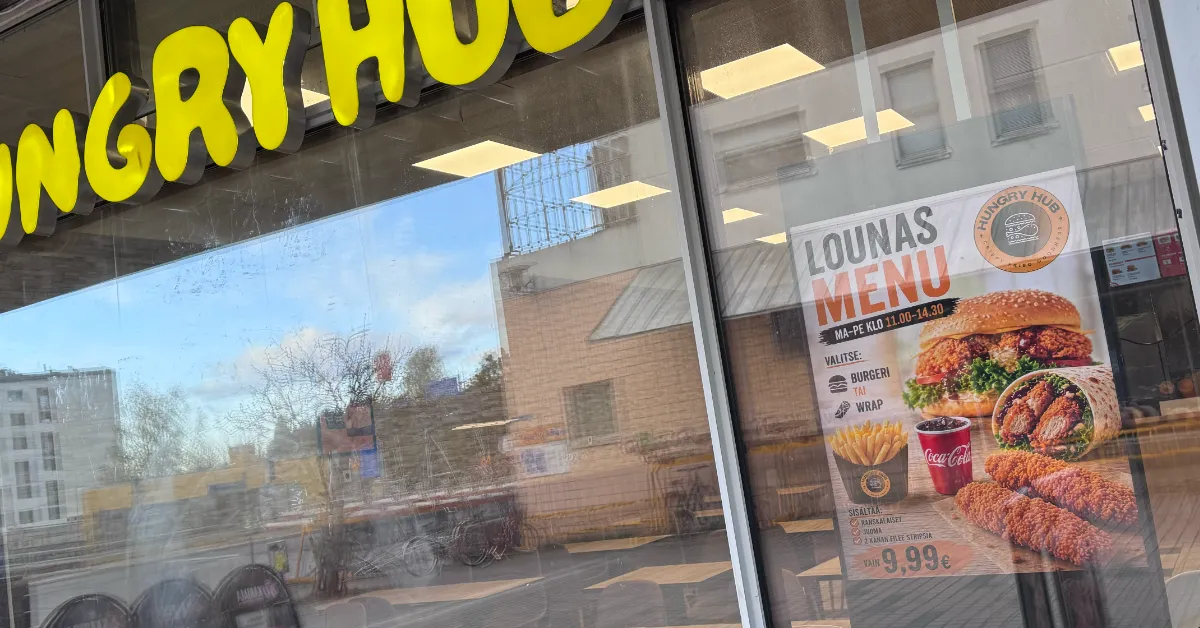
In 2026, Pretty Boy, a Helsinki-area street-food chain with 9 locations, switched all its menus to digital so each location can run real-time, location-specific updates (invidis, April 2026). The bigger Finnish names are not far behind. For a Finnish customer story closer to InfoBox, see how Kuparitarha lifted early-evening foot traffic 30%+ from the window display alone.
What Should You Actually Display?
The single biggest mistake is treating the screen like a static poster. The screen is dynamic, so the content should be too. In practice, a working restaurant signage rotation has six content types, each pulling its weight at different moments of the day.
- Daily menu and specials. Today's hot dish, today's soup, today's dessert. This is the highest-ROI content because it aligns the customer's choice with what your kitchen wants to push (margin, prep capacity, leftovers). Refresh every morning.
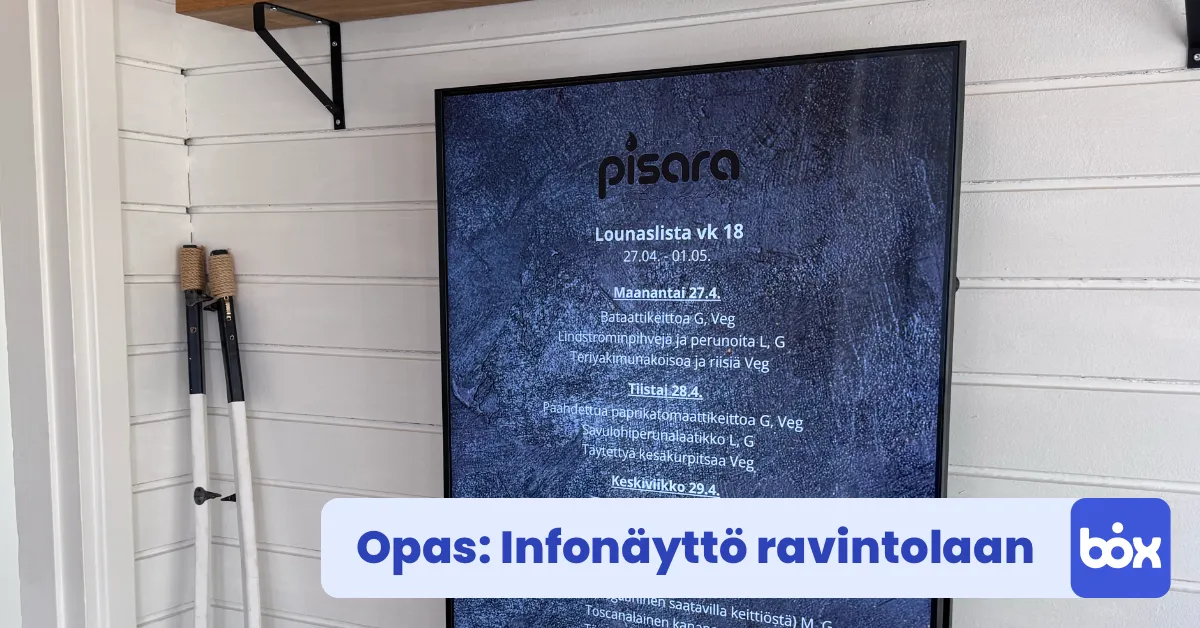
- Lunch board (lounas). If you serve lunch, the lounas list is the single most-watched piece of content in your day. Easiest path: integrate Lounastaja so the list updates itself. The screen shows whatever is in your weekly lounas plan with no manual upload.
- Promotions and campaigns. Happy hour, two-for-one, kids eat free, weekend brunch. These move the needle most when you can schedule them tightly to the right hours and pull them when the campaign ends.
- Ambient and brand content. Beauty shots of your food, a slow-motion pour, a video of your kitchen team plating a dish. This is what makes a customer remember you, and what makes Instagram exist. Loop a few of these between menu slides.
- Social proof. Photos from happy customers, a review screenshot, a recent press mention. Trust signals work just as well on a screen as on a website.
- Operational information. Opening hours, allergen icons, payment options accepted, where the toilet is. Boring but essential. Reduces friction and answers the questions you would otherwise have to answer at the counter.
Across QSR Magazine's 2024 industry data, 73% of diners said in-restaurant technology (digital displays included) improved their guest experience (QSR Magazine, 2024). The same survey found 68% of customers were more likely to buy an item once they saw it on a screen. Both numbers compound when the content rotation actually fits the daypart.
When to Show It: A Daypart Schedule That Works
A Cornell Hospitality Quarterly study found that restaurants applying daypart-specific menu strategies gained 5-7% revenue during slower periods (Kimes, Cornell, 2008). The mechanism is simple: morning customers want different things from evening customers, so showing them the same content all day is leaving money on the table.
Here is a working daypart schedule for a typical Finnish casual restaurant. Adapt the hours to your own opening times.
Morning (7:00–10:30)
Coffee menu, breakfast specials, takeaway promos for office workers. Shorter slides, brighter content, prices visible.
Lunch (10:30–14:00)
Lounas board front and centre. Auto-updates if you use Lounastaja. Mix in dessert and drink upsells. This is your highest-volume window, no other content should compete with the menu.
Afternoon (14:00–17:00)
Coffee and pastry slides, ambient brand content, a "happy hour starts at 16:00" countdown if you run one. Quieter rotation, less hard-sell.
Dinner (17:00–22:00)
À la carte highlights, wine pairings, weekend brunch reminder for tomorrow. Slower slide transitions (8-10 seconds) so people can actually read.
Late night (22:00–close)
Bar specials, closing hours, "we open again at..." for the morning crowd walking past after midnight.
Practical tip from working with 100+ Finnish restaurants: the most common scheduling mistake is making slides too slow during lunch (people are in line, scanning, deciding fast) and too fast during dinner (people are seated, browsing, want to read).
InfoBox handles all of this from the browser. You define the content for each daypart once, and the system rotates automatically. Nothing to remember, nothing for staff to switch over. See the full feature walkthrough.
Common Mistakes to Avoid
Restaurants that get less than the 3-5% sales lift usually share the same handful of mistakes.
- Too much text per slide. A slide is read in 2-3 seconds, not 20. If you cannot read it from across the room while walking, it is too dense. Cut it in half. Then in half again.
- Slides too slow or too fast. 5-8 seconds is the sweet spot for menu items. Promotions can run 8-12. Beauty shots and ambient content 10-15. Anything outside this band feels broken.
- Forgetting to update. A digital sign with last week's content is worse than a static menu, because customers stop trusting any of it. The fix is scheduling. Set today's specials in the morning, the weekly content on Monday, and forget about it.
- One playlist for all locations. If you have 3 locations, each one has different walk-in patterns, neighbourhood demographics, and stock levels. InfoBox lets you push the same content everywhere or schedule different content per screen. Use the latter.
- Generic stock images. A Getty stock photo of "happy people eating burgers" works against you. Customers can spot it instantly. Use your own food, your own team, your own dining room. Phone photos in good light beat any stock library.
- Ignoring brightness and glare. A south-facing window in summer washes out a 300-nit TV completely. If your screen is in direct sunlight, you need a high-brightness commercial display, not a regular TV. Our window display guide covers the brightness math.
How Much Does It Cost in 2026?
InfoBox pricing for restaurants is transparent and tiered by the number of screens. Software is billed annually: 9 €/month per screen for 1-9 screens, or 7 €/month per screen for 10-50 screens. Most customers don't need separate hardware at all: InfoBox runs directly on Android TVs, Android sticks, and other Android devices. If you do need hardware, the InfoBox stick is available for 59 € each, one-time.
For a typical Finnish restaurant the math looks like this:
| Number of screens | Annual price (software) |
|---|---|
| 1 screen (one window) | 108 €/yr (9 €/mo) |
| 3 screens (window + lunch + bar) | 324 €/yr |
| 5 screens (full restaurant) | 540 €/yr |
| 10 screens (volume tier kicks in) | 840 €/yr (7 €/mo/screen) |
| 50 screens (large chain) | 4,200 €/yr |
Need hardware? Most customers don't. InfoBox runs directly on Android TVs, Android sticks, and other Android devices. If your screen isn't Android-compatible, the InfoBox stick is available at 59 € each, one-time.
For comparison, the international competition (ScreenCloud, Yodeck, OptiSigns, Samsung MagicInfo) typically charges 20-40 €/screen/month. At 5 screens, that is 1,200-2,400 €/year on software alone. InfoBox is built in Finland, runs in Finnish, and costs 4-5 times less.
The 14-day free trial of the software does not require a credit card. You can order the stick when you decide to keep it, with a 30-day return policy on the hardware. See full pricing.
Getting Started in Three Steps
The fastest path from "we should try this" to "first content live on screen" is under 15 minutes.
- Install InfoBox. Download the InfoBox app from Google Play onto your Android TV or your own Android stick. Or plug the InfoBox stick (€59) into the HDMI port of any TV. Connect to the restaurant Wi-Fi. The screen shows a pairing code.
- Pair to your account. From the InfoBox dashboard in your browser (laptop or phone) you enter the pairing code. The screen is now linked.
- Upload your first content. Drag a PDF of your menu, a photo of today's special, or a Canva-designed promotional slide into the dashboard. Set the schedule. Done.
Adding more screens repeats steps 1 and 2. All content is managed from one dashboard regardless of how many screens or locations you run.
Frequently Asked Questions
Can I use my existing TV?
Yes. Almost any TV with an HDMI port works. The InfoBox stick plugs directly into HDMI, takes power from USB or a wall adapter, and connects to Wi-Fi. We have customers running TVs from 32 inches up to 75 inches without issue.
How quickly can I update content from my phone?
Instantly. The InfoBox dashboard is a normal web browser, so you log in from your phone, drag a new image or change a slide, and the screen updates in seconds. No app to install, no IT to call.
Do I need the InfoBox stick?
Not necessarily. InfoBox runs directly on Android TVs, Android sticks, and other Android devices many customers already own. If your screen isn't Android-compatible, the InfoBox stick is available for 59 € each, one-time. The software side is always per-screen (9 €/month for 1-9 screens, 7 €/month for 10-50, billed annually).
Does it work if my Wi-Fi drops?
Yes. InfoBox keeps showing your latest synced content even when the internet is down, and resyncs automatically when the connection returns. Customers do not see anything change.
Can I integrate Lounastaja for daily lunch menus?
Yes. There is a built-in Lounastaja integration. You point the screen at your Lounastaja URL once, and the lunch list updates itself daily with no manual work.
Conclusion
A digital screen in a restaurant is not a poster, it is a tool. The restaurants getting the 3-5% sales lift are the ones thinking about content (six categories, each with a job), schedule (daypart-specific, automated), and freshness (set once, forget). The software costs less than the staff coffee budget. Hardware often isn't needed at all, since InfoBox runs on the Android devices you already own. The only thing left is the decision to start.
If you already have a TV, see how to turn it into a signage display. If you are buying new, the media player comparison covers your options. Or just book a 15-minute demo and we will show you what your menu would look like on screen tomorrow.
If your restaurant doesn't have a suitable TV and you'd rather not source the hardware separately, digital signage leasing is also available: a Hisense or Maxhub professional display (32–100 inches, 4K UHD, 24/7-rated), InfoBox software, wall mount, and pre-installation in one package starting at €24 per screen per month (36-month lease through Grenke). The display can ship with the Lounastaja integration pre-configured if you provide the URL at order time.
Author
Kasper Välimäki
CEO, InfoBox
Kasper is the founder and CEO of InfoBox. He has helped hundreds of Finnish businesses deploy digital signage in restaurants, retail stores, offices, and construction sites.
Learn more