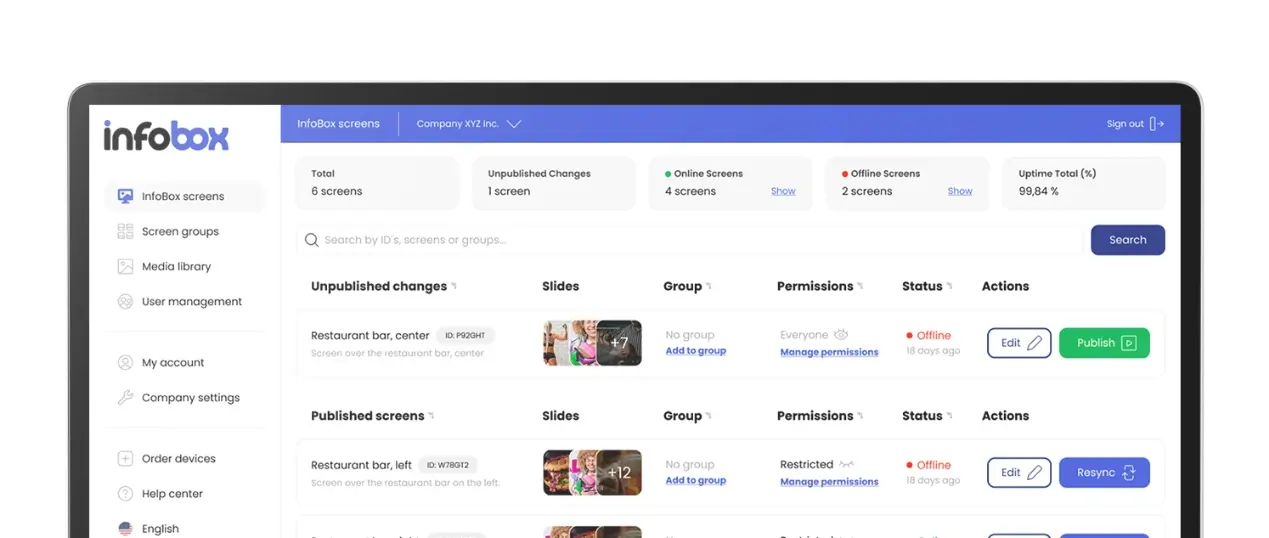
InfoBox Platform is a browser-based management system for controlling all your digital signage screens from one place. This guide covers every key feature.
InfoBox Platform is a browser-based management system for controlling all your digital signage screens from one place. There is no separate app to install, no IT expertise required, and no local setup. You open a browser, log in, make changes, and they appear on the display immediately.
This guide covers every key feature of the Platform: what content types you can display, how scheduling works, how to manage multiple screens simultaneously, and how to share access with your team.
What content can you display?
InfoBox Platform supports several content types. The most common are images (JPEG, PNG, WebP) and PDFs, which work well for menu photos, campaign posters, and notices. Videos play directly without any codec configuration.
A particularly useful feature is URL support: you can add a direct link to any webpage or web application as a slide. This makes it possible to display Power BI dashboards in real time, show automatically updating lunch menus via Lounastaja, or embed a Canva presentation directly on screen without downloading files.
- Images: JPEG, PNG, WebP
- PDF: presentations, price lists, notices
- Video: plays directly with no extra settings
- URL: Power BI, Canva, Google Slides, Lounastaja, Sitedrive, and any other web service
Scheduling: the right content at the right time
Every slide can be scheduled individually. You can set a start and end date so the slide only appears during a campaign period. Day-of-week scheduling lets you show a lunch menu on weekdays between 10am and 2pm and automatically switch to a coffee menu in the afternoon.
At the playlist level, you can schedule an entire group of content at once. A Christmas theme can activate automatically on December 1st and switch off in January. The same applies to weekend special offers or event campaigns, all without anyone needing to remember to make changes manually.
- Date range: slide only appears during a chosen period
- Day-of-week: show different content on weekdays and weekends
- Time of day: switch content automatically between morning, midday, and evening
- Playlist scheduling: activate or deactivate an entire content package at once
Multiple screens, one place to manage them
If your business has more than one screen, InfoBox Platform scales without friction. Shared playlists are the key feature here: you create one playlist and push it to a hundred screens with a single click. Changing the content updates all screens simultaneously.
Where needed, screens can also be managed individually. Each screen can run its own playlist, or be linked to several shared playlists at the same time. Screens can be grouped into folders and groups by location or department, which simplifies management in larger organisations.
User permissions and team access
InfoBox Platform includes role-based permissions. An admin can create accounts for other users and define their access precisely: one user can manage only a specific screen, another can manage all screens across an entire location. Adding users costs nothing. All subscription tiers include unlimited users.
This is especially useful for multi-location organisations: each site can manage its own screens independently while head office keeps the brand consistent through shared playlists. The IT department does not need to be involved in day-to-day content management.
Integrations and dynamic content
InfoBox Platform's URL support makes it an open ecosystem. If a service can expose content via a URL, InfoBox can display it. Examples from current customers:
- Lounastaja: a restaurant's lunch menu updates automatically on screen whenever it changes in Lounastaja
- Power BI: a sales or production dashboard displays in real time with no manual refreshes
- Sitedrive / CALS / Takting: construction project schedules and safety notices on screen in the site canteen
- Canva / Google Slides / SharePoint: presentations and marketing materials streamed from the cloud to screen without downloading files
Getting started
Setup is straightforward: you order the device, plug it into your TV or monitor via HDMI, connect to the network, and log in to the management interface. The software comes pre-installed on the device. Most customers have their first content on screen in under 15 minutes.
All new customers receive an onboarding call via Teams where we walk through the platform and answer questions. Support continues via phone and email after that.
Pricing
InfoBox is delivered as a device and software bundle. The device costs €59, and software is €9/month/screen (1–9 screens) or €7/month/screen (10–50 screens), both billed annually. For 50+ screens, request a custom quote. You can try the software free for 14 days before committing.
Full details and how to get started: InfoBox pricing.
Final thoughts
InfoBox Platform is built for businesses where what matters most is a working solution without an IT project. Browser-based management, flexible scheduling, unlimited users, and an open integration architecture make it a practical choice for a single restaurant and a multi-location chain alike.
Want to see the Platform in action? Book a free demo and we'll walk through every feature in under 15 minutes. You can also browse the features page first.

Author
Kasper Välimäki
CEO, InfoBox
Kasper is the founder and CEO of InfoBox. He has helped hundreds of Finnish businesses deploy digital signage in restaurants, retail stores, offices, and construction sites.
Learn more