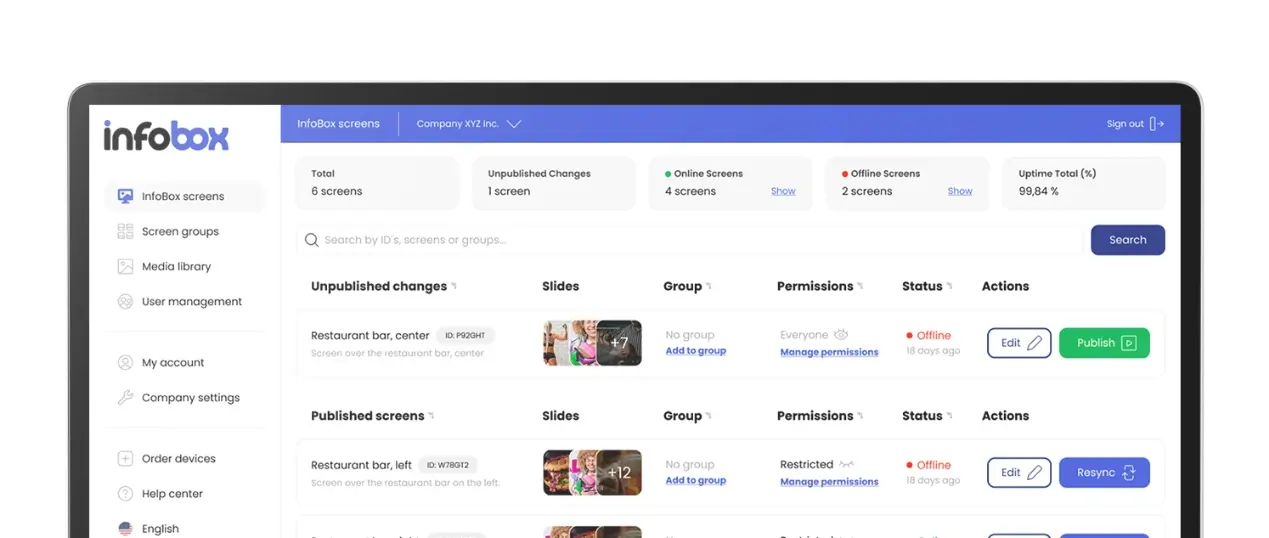
A plug-and-play digital signage setup goes from unboxing to live content in 15 minutes. No IT support, no complex installation. Hardware from €59, software from €7/month per screen.
Most businesses don't need a complex digital signage system with IT consultants and custom installations. What they need is a screen, a small device that plugs in, and software they can update from their phone. That's exactly what plug-and-play digital signage delivers. A 2024 Mood Media study of 1,000 shoppers found that 58% actively notice in-store digital displays and nearly half say the content influenced a purchase decision. The barrier to entry has never been lower.
Key Takeaways
- Setup takes 15 minutes from unboxing: plug into HDMI, connect to Wi-Fi, upload content.
- Hardware from €59 one-time; software from €7/month per screen on an annual plan.
- No IT support needed. Any TV or monitor with HDMI works as the display.
- 58% of shoppers actively notice in-store digital displays (Mood Media, 2024).
What Is Plug-and-Play Digital Signage?
Plug-and-play digital signage means a media player small enough to fit in your pocket connects to any screen via HDMI, runs the signage software, and receives content updates over Wi-Fi. You don't install software on a PC, you don't hire a technician, and you don't need dedicated hardware. The device handles everything automatically once it's connected.
The global digital signage market reached USD 21.45 billion in 2025 and is growing at 6.1% per year, according to a February 2026 MarketsandMarkets report. A large part of that growth comes from exactly this segment: small and medium businesses that previously found signage too expensive or complicated to deploy.
What's in the Box?
A plug-and-play digital signage kit contains three things. Understanding each one makes it easier to evaluate whether the setup fits your needs.
📦 The Media Player
A compact HDMI stick or box, roughly the size of a large USB drive. Connects to your TV or monitor and runs the signage software. InfoBox hardware starts from €59 one-time.
☁️ The Software
A browser-based dashboard where you upload images, videos, and slides, build playlists, and set schedules. No installation required. InfoBox Platform starts from €7/month per screen on an annual plan.
📺 Your Screen
Any TV or monitor with an HDMI port works. You likely already own one. If not, a 43" Full HD TV from a second-hand market costs €50–100 and works perfectly for most indoor signage.
Setup in Three Steps
Most InfoBox customers have their first piece of content on screen within 15 minutes of opening the box. Here's exactly what the setup looks like.
- Plug the InfoBox into your screen's HDMI port. Connect the power cable. Switch your TV input to the correct HDMI source. The device boots automatically and shows the InfoBox setup screen within about 30 seconds.
- Connect to Wi-Fi. Use the on-screen menu to select your network and enter the password. If you need a wired connection, choose InfoBox Pro, which has an Ethernet port. The device connects and links itself to your InfoBox account.
- Upload your first content in the dashboard. Log in at the InfoBox web portal, upload an image or video, assign it to your screen, and it appears within seconds. You can add schedules, build playlists, and manage multiple screens from the same browser tab.
That's it. No configuration files, no IT tickets, no site visits required for any future content updates. Everything from that point on is managed remotely.
Why Simplicity Matters
Many businesses have tried digital signage before and given up. The culprit is usually software that requires a local PC, content that needs a designer to update, or a system where changing a single slide takes 20 minutes. Plug-and-play systems remove all of that friction. When updating content takes 30 seconds from anywhere with an internet connection, businesses actually keep their screens current, and that's when signage starts producing results.
What Can You Display?
A common misconception is that plug-and-play signage only supports static images. In practice, you can display a wide range of content formats, and the best results typically come from mixing types to keep screens fresh.
- Images and graphics: JPEGs, PNGs, and designed slides from Canva or PowerPoint. The most common format and the easiest to create.
- Video: Full HD video plays smoothly. Ideal for product demonstrations, atmosphere content, promotional clips, or brand storytelling.
- Playlists: Combine multiple images and videos into a rotating sequence with custom timing per slide. A restaurant might show a menu slide for 8 seconds, then a promotion for 5 seconds, then a brand video.
- Scheduled content: Set different playlists for different times of day or days of the week. Lunch menu from 11am to 2pm, dinner menu from 5pm, happy hour offers on Fridays automatically.
- Multiple screens: Add screens to the same account as you expand. Each screen can show the same content or completely different playlists, managed from one dashboard.
Where Are Plug-and-Play Displays Used?
Any business that communicates with people in a physical space can benefit. Here's how different industries use it in practice.
🍽️ Restaurants and Cafes
Digital menus that update automatically when dishes sell out. Lunch specials that switch to dinner offers at 4pm without anyone touching the screen. Mood-setting video content during quieter periods.
🛒 Retail Stores
Promotional content at the exact moment customers are making purchase decisions. New product launches, seasonal campaigns, and loyalty programme reminders synced across multiple locations from one dashboard.
💇 Salons and Wellness Businesses
Service menus and seasonal offers shown in the waiting area. Customer testimonial videos and before-and-after content. New treatment launches communicated to every client who visits.
🏢 Offices and Workplaces
KPI dashboards, safety notices, shift schedules, and company announcements on screens in break rooms and corridors. Reaches every employee without relying on email or notice boards.
🏗️ Construction Sites
Safety protocols, daily site briefings, and emergency procedures on screens in site offices and welfare units. Content updated centrally across multiple sites without anyone travelling to each location.
🎉 Event and Hospitality Venues
Event schedules, wayfinding, sponsor content, and quick programme updates. Content changes instantly when plans shift, without reprinting any materials.
Scheduling: The Feature That Changes Everything
The single biggest advantage of a cloud-managed system over a USB stick or a manually updated screen is scheduling. Set it once and the screen manages itself.
A restaurant sets up five playlists on a Sunday: breakfast (7–11am), lunch (11am–3pm), afternoon coffee (3–5pm), dinner (5–10pm), and closing (10pm–close). Each playlist has its own content, its own timing, its own look. The system runs those playlists every day of the week without any manual input. If the lunch special changes on Thursday, the owner logs in from their phone, swaps one image, and every screen in every location updates within seconds.
This kind of automation is what makes digital signage genuinely useful rather than just visual wallpaper. Content stays current because updating it is easy, not because someone remembers to do it.
Plug-and-Play vs. the Alternatives
It helps to understand what you're choosing instead of when evaluating plug-and-play signage.
- USB stick on a loop: you copy files to a stick and plug it in. It works, but updating means physically swapping the stick at each screen. No scheduling, no remote updates, no multi-screen management. Fine for one screen that never changes, not useful for anything dynamic.
- Smart TV apps: some Smart TVs have built-in signage apps. They vary wildly in quality, often stop receiving updates, and lock you into a single manufacturer's ecosystem. You can't manage them across different TV brands from one place.
- Enterprise signage systems: full-featured platforms designed for large retail chains or corporate networks. They start at €20–50 per screen per month and often require a dedicated IT team to configure and maintain. Powerful, but far more than most small businesses need.
- Plug-and-play (InfoBox): hardware from €59 one-time, software from €7/month per screen on an annual plan. Remote management, scheduling, multi-screen support, and no technical expertise required. The right fit for businesses running 1–20 screens.
What Does It Cost?
The economics of plug-and-play signage are straightforward. Hardware is a one-time purchase; software is the ongoing subscription.
InfoBox hardware starts from €59 per device (one-time). Software is priced by volume, billed annually: €9/month per screen for 1–9 screens, or €7/month per screen for 10–50 screens. For a single screen, that's €108/year. A two-screen setup comes to €216/year. According to a Rise Vision 2025 cost analysis, a basic single-screen digital signage setup typically costs USD 680–3,400 all-in when purchased through specialist vendors. The plug-and-play route delivers the same core functionality for a fraction of that.
Most businesses recoup the cost quickly. If digital signage replaces even two or three printed poster runs per month, or drives a small measurable increase in average order value, the numbers work out within weeks rather than months.
Frequently Asked Questions
Does the TV need to be a commercial display or can I use any screen?
Any TV or monitor with an HDMI port works. For typical indoor use in a normally lit space, a consumer TV is perfectly adequate. Commercial displays make sense for outdoor installations, high-brightness window placements, or screens running 16–24 hours a day in demanding environments. See our TV vs. commercial display comparison for details.
What happens to the screen if the Wi-Fi drops?
InfoBox caches content locally on the device. If the connection drops, the screen continues playing the last downloaded playlist without interruption. It reconnects and syncs automatically when the connection is restored. The screen never goes blank due to a Wi-Fi outage.
Can I manage screens in different locations from one account?
Yes. All screens linked to your InfoBox account are visible in one dashboard. You can push the same content to all screens simultaneously, or assign different playlists to different locations. There's no limit on the number of locations or screens you can manage from one account.
How do I create the actual content for the display?
Most businesses use Canva, PowerPoint, or Adobe Express to design slides and export them as images. InfoBox also supports video files. You upload the files directly to the dashboard, no graphic design background needed. Canva has a free tier and hundreds of digital signage templates ready to customise.
Is there a minimum contract length?
InfoBox has one billing cycle: annual. Pricing is based on volume: €9/month per screen for 1–9 screens (€108/year per screen), dropping to €7/month per screen for 10–50 screens. There's no minimum screen count, so you can start with one display and add more as you grow.
For the same Plug & Play experience without a separate hardware purchase, digital signage leasing is also available: a Hisense or Maxhub professional display, InfoBox software, and pre-installation in one package starting at €24 per screen per month (36-month lease through Grenke). The display arrives pre-configured, so setup is still just plug in power.

Author
Kasper Välimäki
CEO, InfoBox
Kasper is the founder and CEO of InfoBox. He has helped hundreds of Finnish businesses deploy digital signage in restaurants, retail stores, offices, and construction sites.
Learn more