A digital signage system explained: screens, media players and cloud software. What each part does, costs from €7/month and how to choose right.
A digital signage system replaces traditional printed posters, notice boards, and static advertisements with dynamic content that can be updated remotely in seconds. In Mood Media's 2024 study, 58% of shoppers said they actively notice in-store digital displays, and nearly half said the content influenced a purchase decision (Mood Media, 2024). In this guide, we walk through what a digital signage system consists of, how it works, and how you can put it to work in your business.
Why Are Businesses Moving to Digital Displays?
Traditional posters are cumbersome: printing costs money, swapping them out requires physical presence, and outdated content often stays up for weeks. Digital displays solve all of these problems at once.
- Real-time updates: Change content instantly, whether it is lunch menus, promotions, or announcements.
- No printing costs: Campaign materials are updated in software, not at the print shop. The long-term savings are significant.
- Scheduling and automation: Show the right content at the right time without manual effort. Your lunch menu switches to the dinner menu on schedule.
- Brand reinforcement: Moving visuals capture attention and are remembered far better than static posters.
- Remote management: Control all your displays from one place, even if you have locations in different cities.
58%
of shoppers actively notice in-store digital displays
Source: Mood Media, 2024
~50%
say on-screen content influenced a purchase decision
Source: Mood Media, 2024
$21.45B
global digital signage market in 2025, growing 6.1% per year
Source: MarketsandMarkets, 2026
The Components of a Digital Signage System
A complete digital signage system consists of three main components that work together seamlessly.
Display Device
Almost any television or professional screen with an HDMI input will work as a display. Specialist screens are not always required, which keeps startup costs manageable. Purpose-built commercial displays are designed for long operating hours and remain bright in well-lit environments.
Media Player
The media player connects your display to the content management software. It receives content from the cloud and plays it on screen. The simplest form is a small HDMI stick, such as the InfoBox media player (€59), which plugs directly into any HDMI port. Alternatively, an Android TV or Android device can serve as the player without any separate hardware.
Content Management System (CMS)
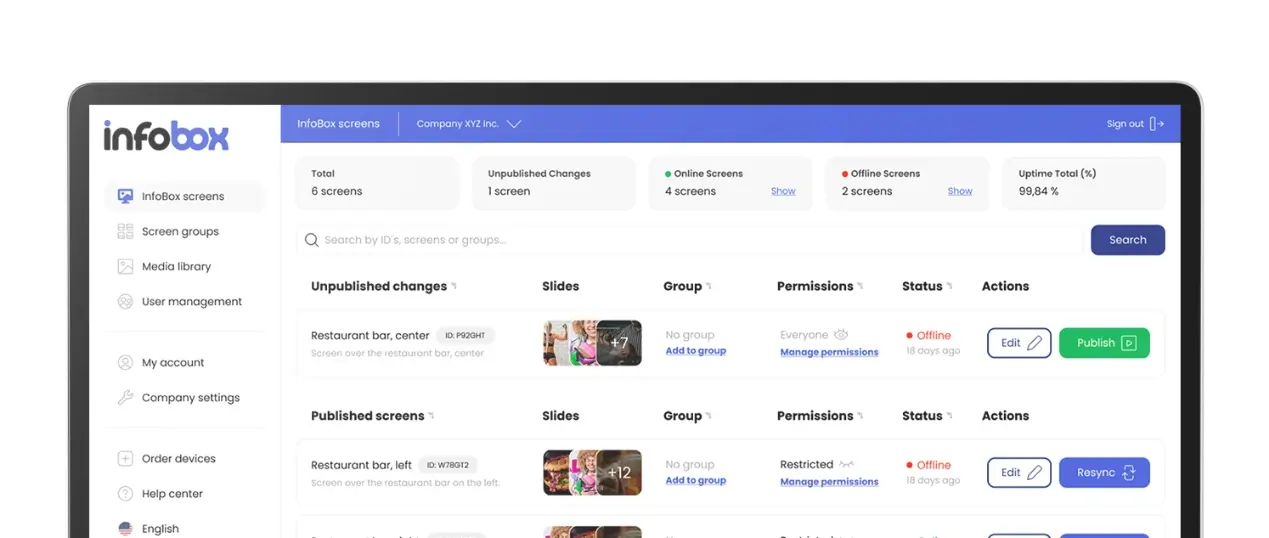
The CMS is the brain of the operation. This is where you create, schedule, and manage all content across your displays. A good CMS works in the browser without any installation, supports multiple users, and provides remote control over all screens. InfoBox's platform is built so that anyone can get started without IT support.
Types of Digital Signage Solutions
Not all digital signage solutions are the same. Depending on your needs, the right solution can look very different.
Static Digital Displays
At the simplest level, this means playing an image or video from a USB stick or memory card. Content is changed manually on-site. This works for basic use cases, but there is no remote management and no scheduling capability.
Cloud-Managed Displays
The most common solution for businesses. The display connects to the internet and a cloud-based CMS. Content can be managed from anywhere, scheduled weeks in advance, and pushed to all screens simultaneously. This is how InfoBox works, and it is the best fit for businesses with multiple displays or locations.
Touch Screen Displays
Interactive displays allow customers to browse content themselves, such as interactive menus or maps. These are commonly used in shopping centers and self-service kiosk environments.
Digital Signage Use Cases by Industry
Digital signage systems fit almost every industry. Here are concrete examples of how businesses are using them:
🍽️ Restaurant
Digital menus switch automatically from lunch to dinner service. Daily specials, allergen information, and weekly dishes are always current without printing or manual swapping.
🏋️ Gym
Group fitness timetables, personal trainer promotions, and motivational messages display in reception and changing rooms. Event calendars update remotely in minutes.
🏢 Office
Internal announcements, KPI dashboards, room bookings, and news are visible at a glance without email overload. Power BI dashboards can be shown directly on the screen.
🛒 Retail
Promotions, product highlights, and deals draw customers in and guide them to the right products. Impulse purchases increase without additional staff effort.
🏗️ Construction Site
Safety notices, project updates, and schedules appear on site cabin screens. Content is updated from the office without anyone needing to visit in person.
🏨 Hotel and Hospitality
Reception, lobby, and restaurant areas benefit from timely notices and local recommendations. Guests get the information they need right away.
How Customer Experience Improves
Digital signage is not just about advertising. It improves the customer experience in multiple ways. Waiting time feels shorter when engaging visuals hold attention, and navigation becomes easier with clear wayfinding displays. In retail, promotional screens guide customers to the right products and increase impulse purchases without any extra staff effort.
Research shows that digital displays reduce perceived waiting time by up to 35%, which directly improves customer satisfaction scores. In office environments, digital signage keeps staff up to date on important notices without email overload or unnecessary meetings.
A Sustainable and Cost-Effective Choice
Switching to digital signage is also a responsible choice. The need for printed materials drops significantly, meaning less paper waste and lower printing costs. Modern LED displays consume less energy than older lightbox advertising technology, and a quality screen lasts 5 to 10 years in daily use.
In a cost comparison, digital signage pays for itself quickly. When you add up the annual printing costs, distribution, and staff time that traditional communication requires, the monthly fee for a digital signage system looks like a small investment.
How to Choose the Right Digital Signage System
Choosing the right system depends on your business size, the number of displays, and the type of content you want to show. A few key questions will help you find the best fit:
- How many screens do you need? For small businesses, 1 to 3 screens often covers most needs, but it is worth planning for growth from the start.
- Do you need remote management? Multiple locations or frequently changing content require a cloud-managed solution.
- What type of content will you show? Static images, videos, PDF menus, or dynamic data such as Power BI reports?
- How often does content change? A daily-changing lunch menu requires a different setup than a monthly office notice.
- What is your budget? Beyond hardware and software costs, consider ease of setup and day-to-day management. A cheap plan can become expensive if it requires ongoing IT support.
InfoBox: Start Your Digital Signage System Today
InfoBox is a Finnish digital signage platform built for small and medium-sized businesses. The hardware is a pre-installed HDMI media player (€59) that connects to any television or display. The software starts at from €7/mo/screen (billed annually), and a 14-day free trial is available with no hardware required.
Key advantages of InfoBox:
- Price: InfoBox is 4 to 5 times cheaper than most competitors, whose pricing typically starts at €20 to 40 per screen per month.
- Ease of use: No IT expertise required. The demo takes under 15 minutes, and your first screen can be up and running the same day.
- Versatility: Supports images, videos, PDFs, web pages, and integrations including Power BI, Canva, and dynamic menu services.
- Scalability: Works just as well with one screen as with a thousand, on the same platform.
Read more about InfoBox platform features or compare hardware options in our media player comparison.
Frequently asked questions
What is a digital signage system?
A digital signage system is the combination of a screen, a media player and cloud software that together display remotely managed content. The screen shows the content, the media player runs the signage app, and the cloud software is where you upload, schedule and publish everything from a browser.
How much does a digital signage system cost?
With InfoBox the software costs €9 per screen per month for 1–9 screens and €7 per screen per month for 10–50 screens, billed annually. Hardware is optional: any Android TV works directly, and other screens need the €59 InfoBox Basic media player as a one-time purchase.
What hardware do I need for digital signage?
Any Android device works: Android TVs run the InfoBox app directly with no extra hardware, and for other TVs or monitors you plug a €59 InfoBox Basic player into the HDMI port. There is no requirement to buy new commercial displays for indoor use.
Does a digital signage system work without internet?
Cloud-managed systems need a connection to receive new content, but InfoBox caches the current content on the device, so screens keep playing if the connection drops. Updates sync automatically once the network returns.

Author
Kasper Välimäki
CEO, InfoBox
Kasper is the founder and CEO of InfoBox. He has helped hundreds of Finnish businesses deploy digital signage in restaurants, retail stores, offices, and construction sites.
Learn more