
InfoBox Basic HDMI media player
Turn any screen into a remotely managed display
- Device
- €59one-time
- Software from
- €7 / screen / month
01
Pre-installed and connected
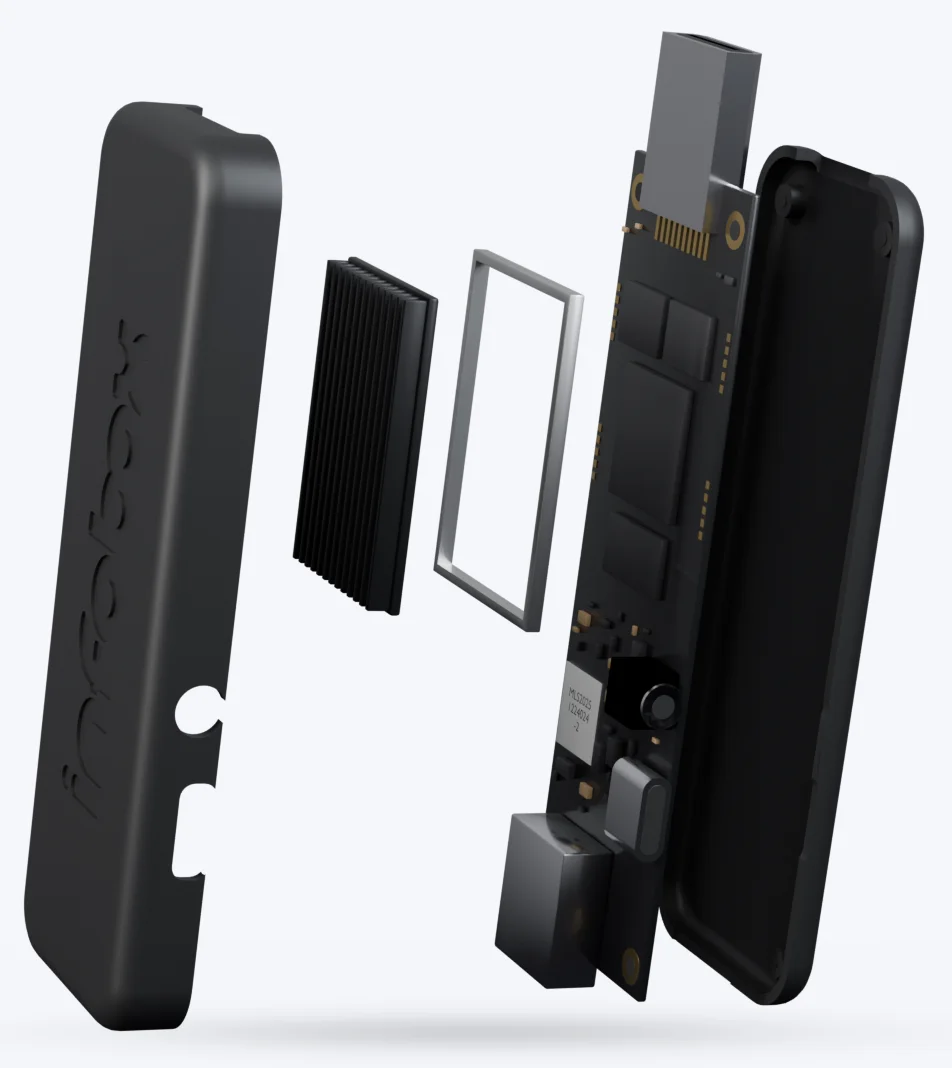
Android and the InfoBox Digital Signage app come pre-installed on the stick. We connect the device to your organization before it ships.
02
Plug it into HDMI
InfoBox Basic works with any screen or TV that has an HDMI port. No smart TV needed.
03
Wi-Fi with the remote
Open the network settings with the Home and Settings buttons on the remote and pick your network. Once it connects, the screen shows as Online in InfoBox Platform.
04
Managed from your browser
Add content, build playlists and schedule them in InfoBox Platform. Changes reach the screen over the network, so nobody has to visit the device.
Who is InfoBox Basic for?
InfoBox Basic is made for screens without Android. If the screen has an HDMI port, the stick turns it into a digital sign you manage from your browser. These are the situations it was built for.
A café TV that isn't Android
The TV is already on the wall, but you can't install apps on it. Plug InfoBox Basic into the HDMI port and the TV becomes a menu board with today's pastries, prices and images you made in Canva.
Restaurant menus through the day
Breakfast, lunch and dinner menus each get their own slide with set weekdays and hours, so the right menu is on screen at the right time.
A shop window
The screen in the window shows passers-by this week's offers and your opening hours. Campaign slides are scheduled to start and end on the right day, so an old offer never lingers in the window.
An office lobby
The lobby screen welcomes visitors and shares what's going on. Bring in content from Canva or Google Slides, and show Power BI reports with the InfoBox Power BI add-on.
Staff and break rooms
Shift rosters, safety instructions and notices appear where staff actually see them. Finnish construction company KSBR has piloted InfoBox Basic in the break rooms of two building sites.
A plain screen with no smart features
An older TV or monitor with no apps at all still works as a digital sign, as long as it has an HDMI port. No need to buy a new screen.
Samsung and LG TVs
Most Samsung and LG TVs run their own operating system (Tizen or webOS), and the InfoBox app isn't available for them yet. Native apps are in development. Until then, InfoBox Basic in the HDMI port is the easiest way to use these TVs.
Many screens across several sites
Every stick shows up in the same InfoBox Platform. Publish one playlist to several screens at once, whether they're in the same room or in different cities.
Included in the delivery
- InfoBox Basic media player
- Android and the InfoBox Digital Signage app pre-installed, the device connected to your organization.
- Remote control
- For choosing the Wi-Fi network: the Home and Settings buttons open the network settings.
What you provide
- A screen with an HDMI port
- Any TV or display, smart or not.
- A Wi-Fi network
- The network name and password, entered once with the remote.
When you don't need InfoBox Basic
If your screen runs Android 8.0 or newer, install the InfoBox Digital Signage app straight from Google Play. Our leased Hisense and Maxhub displays also arrive with the app pre-installed.
See compatible hardwareStick in the screen, software in the browser
InfoBox Basic is our own media player. It plays the content you publish in the InfoBox software, so every InfoBox Basic needs a software license alongside it.
Device
€59
one-time
Android media player and remote control. The device arrives pre-installed and connected, with a 30-day return policy.
Software
from €7
/ screen / month, billed annually
Content, playlists, scheduling and remote management. €9 / screen / month for 1–9 screens and €7 / screen / month for 10 or more.
All prices exclude VAT.
Order InfoBox BasicSpecifications
- Device
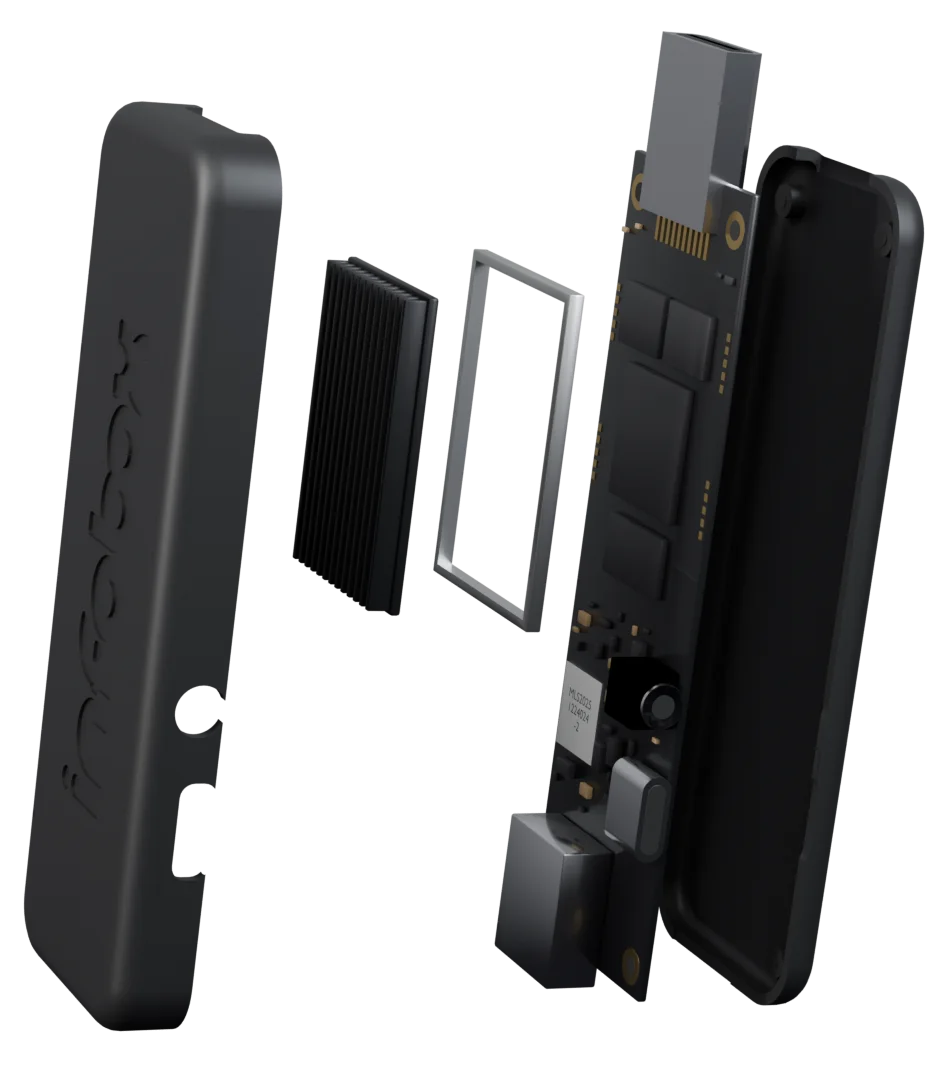
- Android media player with an HDMI connector
- Operating system
- Android, pre-installed
- App
- InfoBox Digital Signage app, pre-installed
- Screens
- Any screen or TV with an HDMI port
- Network
- Wi-Fi
- Memory
- 2 GB DDR4
- Storage
- 8 GB
- Resolution
- 4K UHD
- Connector
- HDMI 2.1
- Remote control
- Included. The network settings open with the Home and Settings buttons.
- Setup
- The device is connected to your organization before delivery, so there is no device ID to enter. Once Wi-Fi connects, the screen shows as Online.
- Management
- In your browser, in InfoBox Platform
- Price
- €59 one-time
- Software
- from €7 / screen / month, billed annually
- Returns
- 30 days
- Warranty
- 24 months
- Shipping
- Free within the EU, 3–7 working days
Every content type on every screen
InfoBox Basic plays everything you add to InfoBox Platform: from images and videos to websites and integrations.
Media
- Images and PDFs
- Videos
- Playlists
Weather and time
- Clock
- Weather
Web
- Websites
- News and RSS feeds
- Bus and train departures
 YouTube
Integrations
 Canva
Canva Google Slides
 Power BI
 SharePoint
Partner services
 Lounastaja
 Sinebrychoff ContentHub
 Sitedrive
 CALS
CALS
Frequently asked questions
Do I need InfoBox Basic?
Not necessarily. If your screen runs Android 8.0 or newer, you can install the InfoBox Digital Signage app straight from Google Play. InfoBox Basic is for screens and TVs that have an HDMI port but no Android.
What does InfoBox Basic cost?
The device is €59 one-time. You also need the InfoBox software: €9 / screen / month for 1–9 screens and €7 / screen / month for 10 or more. Software is billed annually. Prices exclude VAT.
How does setup work?
Plug the stick into the screen's HDMI port, open the network settings with the Home and Settings buttons on the remote and choose your Wi-Fi network. The stick is connected to your organization before it ships, so there is no device ID to enter. Once it connects, the screen shows as Online in InfoBox Platform.
What can I show on the screen?
Every InfoBox content type: images, PDFs, videos, playlists, clock, weather, websites, news and integrations such as Canva, Google Slides and Power BI. Every screen gets every feature.
Does the screen keep working if the connection drops?
Images, videos and PDF pages keep playing from the device's cache, and schedules keep running offline. Websites only show during an outage if they loaded before it started.
How many InfoBox Basic sticks do I need?
One per screen. Each screen also needs its own software license, and you manage every screen from the same InfoBox Platform.
Do I need a Google account?
No. The InfoBox Digital Signage app comes pre-installed on the stick, so there is nothing to download from Google Play and no account to sign in with.
Can I use InfoBox Basic alongside Android screens?
Yes. InfoBox Basic sticks, Android TVs and leased displays all appear in the same InfoBox Platform, and you can publish the same playlist to all of them.
Can I try InfoBox before buying?
Yes. The software has a free 14-day trial, and InfoBox Basic has a 30-day return policy.
Can I return the device?
Yes. The device has a 30-day return policy.
Get a digital sign running with one stick
€59 one-time, software from €7 / screen / month. Prices exclude VAT.