A weekly PowerPoint routine eats hours and still leaves the lunch menu out of date. See how the Lounastaja feed updates the TV, Google Maps, and Facebook from a single entry.
On Monday morning the shift manager of a lunch restaurant opens PowerPoint, updates last week's slide, saves it to a USB stick, and walks over to the TV to swap the file. The same thing repeats on Tuesday, Wednesday, Thursday, and Friday. If someone is off sick or forgets, the screen shows yesterday's menu, and a customer asks at the till whether the soup is really tomato pasta or chicken.
Lounastaja solves this bottleneck from the other end. Once the lunch menu has been entered into Lounastaja once, the same information appears simultaneously on the TV, on customers' phones through Google Maps, on the restaurant's Facebook page, and in the lounaat.info aggregator. This guide compares the real differences between manual updates and the Lounastaja feed: the weekly workload, the risk of errors, the cost, and how easy it is to set up.
We work through a concrete cost calculation, a step-by-step setup, and answers to the five most common questions. The goal is that ten minutes from now you can decide whether the switch is worth it for your restaurant.
Key Takeaways
- Lounastaja is used by over 150 Finnish restaurants, and the menus published through it reach 110,000 weekly lunch visitors on the lounaat.info service (Lounastaja, 2026).
- A manual update typically takes about an hour a week per restaurant and leaves different channels at different states. One entry into Lounastaja updates the TV screen, Google Maps, Facebook, and the website at the same time.
- The InfoBox Platform licence starts at €9/screen/month, and Lounastaja's own subscription is €39-59/month + VAT. The whole package for a five-screen restaurant is roughly €84-104/month + VAT.
- Setup takes under 30 minutes and needs no IT skills. The Lounastaja embed updates on the screen within five minutes of a change being made.
What is Lounastaja and who is it for?
Lounastaja is a Finnish lunch-menu service used by over 150 restaurants, and the menus published through it reach 110,000 weekly lunch visitors in the lounaat.info aggregator (Lounastaja, 2026). The service was founded in 2015 and is priced at €39-59/month + VAT per restaurant depending on the features selected. In practice, Lounastaja carries the same lunch menu from the restaurant's system to several end-user channels at once.
From the restaurant's point of view, Lounastaja replaces three separate tasks. The first is writing the lunch menu as text, either a week at a time or daily. The second is distributing that same information to different channels: the TV screen, the restaurant's website, Facebook, the Google Maps business profile, and possibly a printed A4 sheet at the till. The third is fixing mistakes when one of these is left out of date.
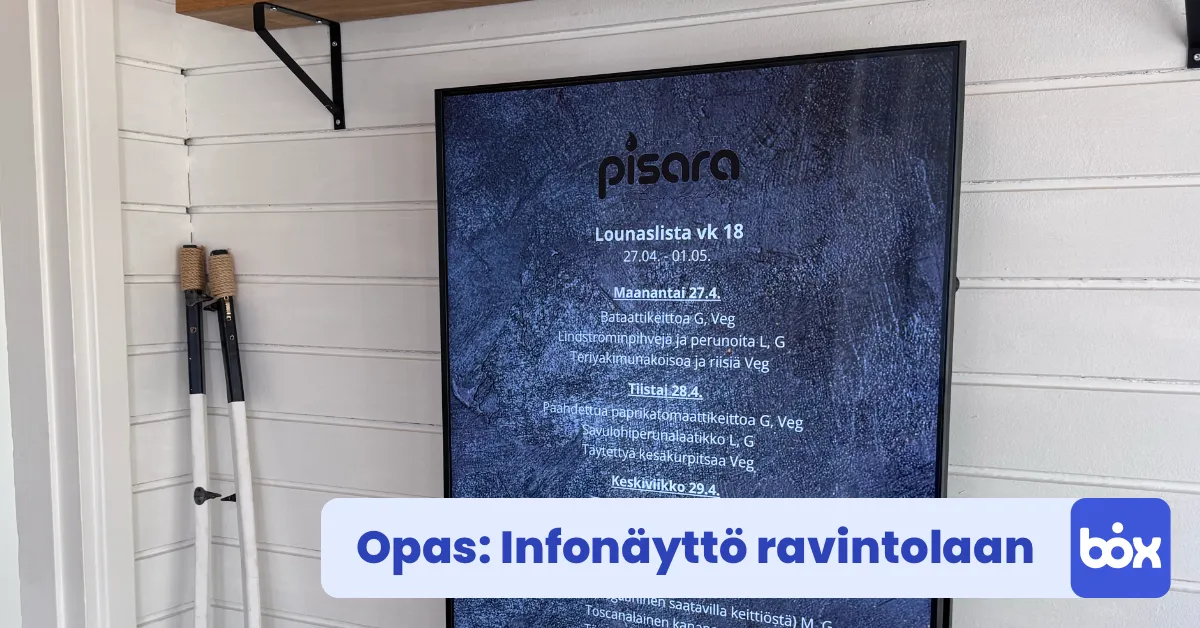
The target group is clear: lunch restaurants, staff canteens, school and college restaurants, and daycare kitchens where the menu changes daily or at least weekly. If the list stays the same for a month, a traditional menu board is enough and you probably do not need Lounastaja. But if you update five times a week and want the same information everywhere from a single entry, the service is in practice the only scalable solution on the Finnish market. The more detailed digital signage for lunch restaurants guide covers the hardware and placement in more depth.
Why does the lunch menu belong on a screen, not on paper?
In the Finnish Hospitality Association's 2024 trend study, 81% of Finns had eaten restaurant food in the previous two weeks, and 68% intended to eat lunch at a restaurant within the next six months (MaRa, 2024). Lunch is a stronger source of revenue than ever, and the decisive difference between a good and a poor lunch restaurant is often how easily a customer can see what is on the menu today.
The difference between a paper board and a TV screen is functional, not aesthetic. A paper note usually stays tidy for one shift. A chalkboard needs a pen and faultless handwriting every morning. An A4 print quickly turns greasy or disappears into the rest of the clutter. A screen stays legible all day, and its content can be changed without walking over to the printer.
The same MaRa study showed that Finns eat restaurant food an average of 3.3 times a week, nearly every other day, and that the share has almost doubled since the turn of the millennium. In 2000 only 43% had eaten restaurant food within two weeks; in 2024 the figure was 81% (MaRa, 2024). Lunch is the core of this volume, and visibility at the exact lunch moment decides who stops and who walks on to a competitor. The more detailed restaurant digital signage guide covers what to show on the screen outside lunchtime.
ate restaurant food in the last 2 weeks (was 43% in 2000)
intend to eat lunch at a restaurant within the next 6 months
restaurant meals per week on average (was 3.6 before the pandemic)
Source: MaRa, Restaurant Dining Trend Study 2024. Sample of 2,126 respondents (aged 15-69), surveyed in November 2024.
How is the lunch menu usually updated, and where does it leak?
In most Finnish lunch restaurants the menu is still updated manually: into PowerPoint, Word, onto paper, or onto a chalkboard. A typical weekly rhythm is five updates, each taking about 10-15 minutes. Growing to one hour a week sounds small, but once you count the shift manager's hourly wage and the work interrupted in the kitchen during the day, the real cost is clearly higher than the working time alone.
In the manual workflow, the bottlenecks cluster around six points. First, the file moves on a USB stick or from cloud storage, and something can go wrong in between so that the screen shows last week's menu. Second, the same person rarely updates both the TV and the Google Maps business profile in the morning: the latter is often left out of date, which shows the customer the wrong dishes in search results. Third, the weekend stand-in may forget the update entirely.
Fourth, allergen information is often missing from the chalkboard, which is a risk under the EU food information regulation if a customer asks and does not get a clear answer. Fifth, multilingual content, for example English alongside Finnish, requires maintaining two separate versions every day. Sixth, the social media update is often left until last, which eats into the restaurant's organic reach on Facebook and Instagram at exactly the moment it would matter most.
In other words, the problem is not that nobody can make a manual PowerPoint. The problem is that the same information has to be entered into five places at once, and at least one of those five is always behind.
How the Lounastaja feed connects to an InfoBox screen
The integration between Lounastaja and InfoBox works through a web feed. Lounastaja provides every restaurant with a ready-made embed that updates on the screen roughly every five minutes (Lounastaja documentation, 2026). The InfoBox screen pulls the same feed and shows the list on the TV without staff having to touch the screen or move files on a USB stick. When the menu is updated from the Lounastaja dashboard, the change appears on screen in under five minutes.
For the user the steps are as follows. First you create a Lounastaja account, if you do not already have one, and enter the week's lunch menu into the system. Lounastaja gives you a ready embed as a URL that you can copy from the dashboard. Second, you open InfoBox Platform and add a new website-slide content item. You paste the URL into the field and choose which screen and what time of day the slide appears.
Technically, Lounastaja also supports JSON and RSS feeds as well as Full HD and 4K image links, if you want, for example, to include the lunch menu as part of a larger slideshow or process it on your own CMS server. For most restaurants, though, the ready embed is enough, and setting it up takes about five minutes. Multilingual content works through the ISO 639-1 language code: with one parameter change you get the same list in Finnish, English, or Swedish, and with InfoBox you can rotate between the different language versions to suit your customers. The InfoBox and Lounastaja partnership is an official one, so the integration is supported on both sides.
Manual updates vs the Lounastaja feed: a comparison
Comparing across six dimensions reveals that the difference between manual updates and the Lounastaja feed is not only time saved, but also errors eliminated and visibility multiplied. One entry into Lounastaja updates five channels at once: the TV screen, Google Maps, Facebook, the lounaat.info aggregator, and the restaurant's website. The manual workflow typically updates only one channel at a time.
In practice this means that restaurants using Lounastaja are freed from the manual update routine to the tune of about an hour a week per shift manager, and there are no two different versions of the information in different channels. In the manual workflow the Google Maps business profile, for example, is often left un-updated, which shows the wrong dishes in search and sends potential passers-by to a competing restaurant.
What does the Lounastaja integration cost in total?
The total cost of the Lounastaja integration splits into two parts: Lounastaja's own subscription, which is €39-59/month + VAT per restaurant (Lounastaja, 2026), and the InfoBox Platform licence, which is €9/screen/month (€7/screen/month from ten screens up). For a single-screen lunch restaurant the package is about €48-68/month + VAT. For a five-screen restaurant, that is one outside, two inside in the customer area, one at the till, and one in the kitchen, the package is roughly €84-104/month + VAT.
If you value the shift manager's hour a week as working time alone at about €25, the manual lunch-menu update costs roughly €100 a month in working time alone. The integration therefore pays for itself before you even count the error risk, the multi-channel visibility, or the consistency of allergen information across languages. You can find the exact pricing and packaging details in the InfoBox pricing.
No extra hardware is needed if the restaurant already has an Android TV (for example a Sony Bravia, Philips Android TV, Maxhub display, or TCL Google TV). For older TVs, the €59 InfoBox Basic device is available and plugs into the HDMI port. The total first-year investment for a five-screen restaurant is therefore about €1,100-1,350, including five €59 Basic devices if needed, in case the TVs are not Android-compatible.
Step-by-step setup, in under 30 minutes
Connecting the Lounastaja feed to an InfoBox screen typically takes under 30 minutes. Setup needs no IT skills, and if you get stuck at any point, InfoBox onboarding is included in the price. The steps, in order, are as follows.
- Open your Lounastaja account and copy the embed URL. Log in to the lounastaja.app dashboard, open the week's lunch menu, and click the Digital screen tab. Copy the embed URL provided onto the clipboard.
- Open InfoBox Platform and create a new website slide. Log in at app.infoboxi.com, choose the Slides view, click Add new, and choose website as the type. Paste the copied URL into the field.
- Set the slide schedule. Choose what time of day the slide appears, for example 10:00-14:00 for lunch. You can leave the slide on for the whole day or rotate it with other content.
- Connect the slide to the screen you want. Drag the slide into the slideshow of the screen you want. You can add the same slide to several slideshows if the same list appears on more than one screen.
- Test that the change appears in under five minutes. Make a small change in the Lounastaja dashboard (for example add a full stop after a dish name) and check that the change shows on the TV within five minutes. If the delay is longer or the update does not arrive at all, the problem is usually either the network connection or the allowed-sites setting in Lounastaja. Both are usually fixable in a few minutes with InfoBox support.
Want to see how the Lounastaja feed looks in your own restaurant?
Book a 15-minute demo and we will walk through the integration with your own menu and tell you whether it fits your current TVs or whether you need a Basic device.
Conclusion
Showing the lunch menu automatically is not a complex technical solution, but a basic tool that should be standard equipment in every lunch restaurant. The single-entry model, where the list entered into Lounastaja updates on the InfoBox screen, in Google Maps, on Facebook, in the lounaat.info aggregator, and on the restaurant's website, frees up the shift manager's time, eliminates practically all errors related to out-of-date information, and lifts the lunch restaurant's visibility to a level a competitor without a comparable integration cannot match.
Setup takes under 30 minutes, the total cost is about €48-68/month for a single-screen restaurant, and the Lounastaja subscription (€39-59/month + VAT) is probably already in place if you have even considered your visibility on the lounaat.info service. InfoBox's share of the package starts at €9/screen/month, a smaller cost than a single Thursday lunch.
Frequently asked questions
Is Lounastaja free for restaurants?
No. Lounastaja costs the restaurant €39-59/month + VAT depending on the features you choose, with a two-month trial for a one-time €30 fee. Lounastaja is only free for diners, through the lounaat.info, lounasta.fi, and lounasmenu.fi aggregators.
Do I need a separate computer or media player to show the lunch menu?
No. InfoBox runs directly on an Android TV, for example a Sony Bravia, Philips Android TV, Maxhub display, or TCL Google TV. For older TVs, the €59 InfoBox Basic device plugs into an HDMI port. No separate computer or media player is needed.
Can I show the lunch menu on my website, Facebook, and Google Maps at the same time?
Yes. Lounastaja pushes the same list to the restaurant's Facebook page, Google Maps, the lounaat.info aggregator, and an embedded widget on the restaurant's own website. One update in the Lounastaja dashboard appears in every channel, including the InfoBox screen.
How fast does a change appear on screen after I update the menu in Lounastaja?
Under five minutes. The Lounastaja embed is designed to refresh roughly every five minutes, so the delay from the Lounastaja dashboard to the TV is in practice always under five minutes.
Can the Lounastaja menu be shown in multiple languages on one screen?
Yes. The Lounastaja feed supports ISO 639-1 language codes such as fi, en, and sv. With InfoBox you can rotate between language versions in the same screen's slideshow, for example 10 seconds in Finnish and 10 seconds in English. You do not maintain separate single-language versions, because one feed produces every language.

Author
Kasper Välimäki
CEO, InfoBox
Kasper is the founder and CEO of InfoBox. He has helped hundreds of Finnish businesses deploy digital signage in restaurants, retail stores, offices, and construction sites.
Learn more